

Contents
How to Listen to UK Radio Abroad on Your Phone
I’d start with the BBC website for Radio 2 and Global Player for LBC or Capital on iPhone or Android. Check your station at your destination: access can depend on your location and the programme’s rights.
Here’s my checklist:
- Choose your player: use an official app or mobile website; check that TuneIn carries the live station you want.
- Set up before travelling: sign in, save browser links and download any permitted audio for offline listening.
- Check your data allowance: streaming can use your roaming data.
- If playback stops: test Wi-Fi or mobile data, update your player and check battery-saving settings.
An app fault isn’t the same as a rights block. <u>Paying for an app or switching players won’t remove a location restriction.</u>
UK Radio Abroad: Fix Playback Problems
1. Check overseas access and choose how to listen
Check access to BBC Radio 2, LBC and Capital
For BBC Radio 2, open BBC Sounds in a browser to check what plays in the country you’re visiting. The BBC Sounds app is UK-only, so use the website abroad. Radio 2 access varies by location and broadcast rights.
For LBC and Capital, check the official Global Player website or app before travelling. Playback in the UK doesn’t guarantee access abroad: test the live stream when you arrive, as regional licensing can affect availability.
Once you’ve checked which service works, follow the steps below to listen on iPhone or Android.
Compare apps, mobile websites and TuneIn
Short on phone storage? Use a mobile website to avoid downloading another app. Sign-in requirements depend on the service and content.
| Option | Use on your phone | Account | Overseas access | Restrictions |
|---|---|---|---|---|
| BBC website / international BBC app | Website for Radio 2 without an app download; app for Radio 4, the World Service and selected podcasts | Yes | Limited for music stations | Some music, sport and programmes are restricted. |
| Global Player | LBC and Capital through the app or mobile website | Varies | Varies by destination | Regional licensing limits. |
| TuneIn | Brings multiple stations together | No (basic listening) | Limited | Most BBC live stations are unavailable. |
Check station access before paying: paid features won’t restore restricted BBC streams. Choose the fastest option for your destination, then open the station’s official player using the steps in the next section.
sbb-itb-0189741
2. Play UK radio on iPhone and Android
Play BBC Radio 2 on the BBC website
Open Safari on iPhone or Chrome on Android, then visit the BBC international radio directory. Select BBC Radio 2, tap Play and leave the tab open.
If the player asks you to sign in, follow the prompt.
Use the BBC website for Radio 2; the app does not carry it.
Play LBC and Capital on Global Player
Install Global Player from the Apple App Store or Google Play. Open the app, then create or sign in to a Global iD.
Search for LBC or Capital, select the station and tap the live stream.
If playback fails, try the station on the Global Player website in Safari or Chrome. Still no luck? Try the station’s own web player next.
Listen through a station website or TuneIn
In Safari or Chrome, open the broadcaster’s official website, such as LBC or Capital. Select Listen or the live player, follow any sign-in prompt and press Play. Leave the tab open while you listen.
On TuneIn, search for the station’s live stream and check the broadcaster name before pressing play. Results may include on-demand programmes or other feeds instead of the live broadcast.
If the stream will not load or keeps stopping, try the fixes in the next section.
3. Fix playback problems and check location limits
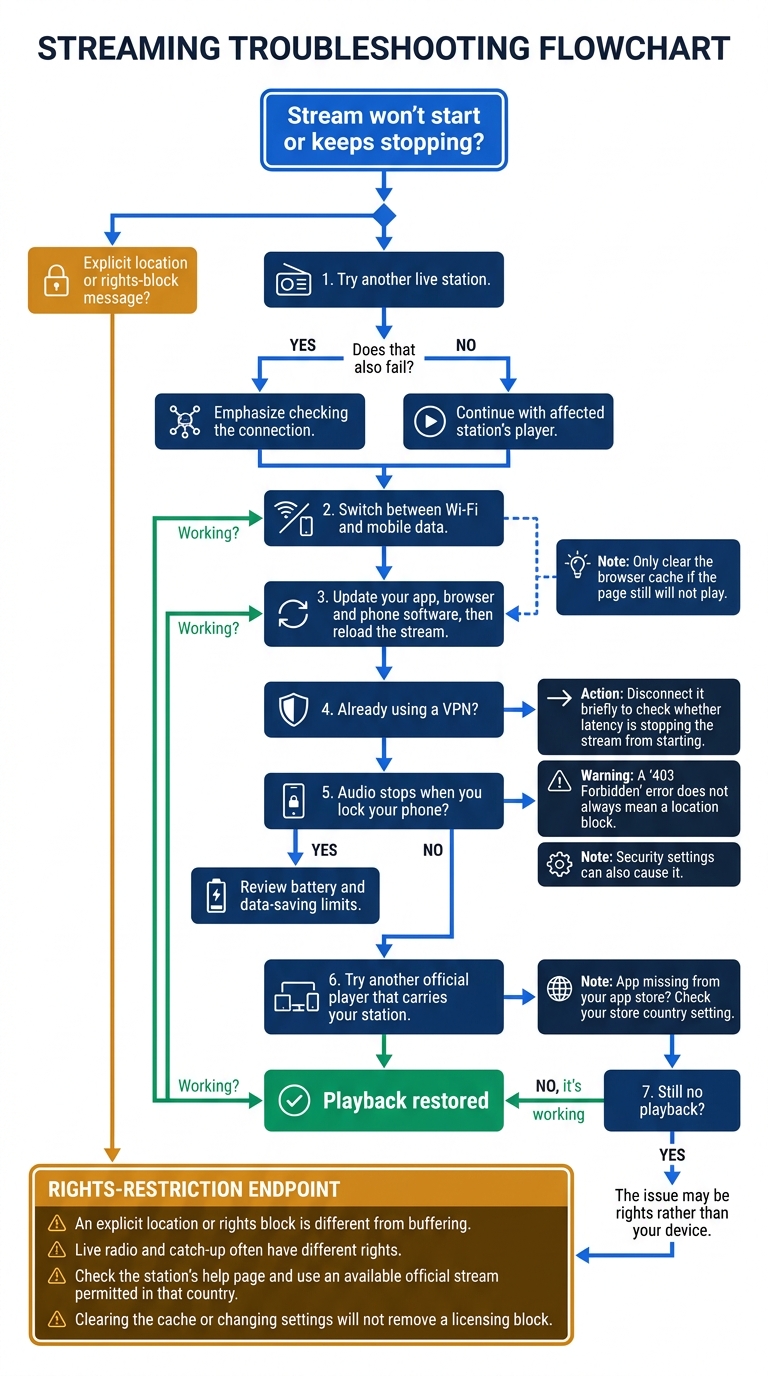
If the stream will not start or keeps stopping, try these checks in order.
Check your connection, app and browser
Try another live station first. If that also fails, switch between Wi-Fi and mobile data. Update your app, browser and phone software, then reload the stream. Only clear the browser cache if the page still will not play.
A “403 Forbidden” error does not always mean a location block. Security settings can also cause it. If you already use a VPN, disconnect it briefly to check whether latency is stopping the stream from starting.
Fix background playback or try another official player
If your connection is working, check whether the app is limiting playback. If audio stops when you lock your phone, review battery and data-saving limits.
Still no playback? Try another official player that carries your station. If an app is missing from your app store, check your store country setting.
Recognise location and rights restrictions
If playback still fails, the issue may be rights rather than your device. An explicit location or rights block is different from buffering. Live radio and catch-up often have different rights. Check the station’s help page and use an available official stream permitted in that country. Clearing the cache or changing settings will not remove a licensing block.
Conclusion: set up your phone before travelling
Once you’ve chosen your station and app, set them up before you travel. For BBC Radio 2, LBC and Capital, check availability, install the apps and sign in before you leave. Bookmark the BBC radio web player, lbc.co.uk and capitalfm.com as browser backups.
Streaming uses data, so check your roaming data limit and fair-use cap. Download any permitted podcasts and catch-up audio before you leave, then test that they play offline.
If a stream won’t play abroad, rights blocks could be the cause. A bookmarked website won’t bypass those blocks.
FAQs
How much data does an hour of radio streaming use?
Data use depends on the stream’s bitrate. A high-quality BBC internet radio stream at 320 kbit/s uses about 144 MB per hour, while a lower-bitrate stream at 128 kbit/s uses around 58 MB per hour.
If your mobile data allowance is limited, keep track of your usage when listening abroad.
Will UK radio schedules follow my local time abroad?
UK radio schedules on official broadcaster apps and websites usually stay on UK time (GMT or BST) when you listen abroad. Live schedules and programme listings generally don’t switch to your local time zone, so factor in the time difference when planning to tune in to your favourite programmes.
Can I listen to UK radio on hotel Wi-Fi?
You can listen to UK radio on hotel Wi-Fi, though location restrictions may apply outside the UK. Services such as BBC Sounds check your location using your IP address and may block restricted content.
If a stream requires a UK IP address, you’ll need a tool that routes your connection through a UK server to listen on your phone or laptop.